Blog/The Best Apps for Students with ADHD in 2026 (Honestly Picked, Not Just Listed)
Tutoremy Blog·Study Tips·12 min read
The Best Apps for Students with ADHD in 2026 (Honestly Picked, Not Just Listed)
TT
Tutoremy Team
Editorial · April 9, 2026
Why this list is structured differently
Most "best apps for ADHD students" lists are 30 random productivity tools tossed into a wall of bullet points. The problem with that format is that ADHD studying isn't broken in 30 ways — it's broken in three specific ways, and the right app depends on which of the three is actually getting you.
The three are:
1. Activation cost — the 90-second wall before you can start. The hardest part of studying is usually not the studying.
2. Dopamine starvation — boring material can't hold ADHD attention. Active formats can.
3. Time-blindness — anything more than 24 hours away might as well not exist.
If you understand which of the three is your biggest problem, you can pick a few apps that actually target it instead of installing 12 things that don't help. We wrote a longer post about how to study with ADHD that walks through this framework in detail — this list is the apps that go with it.
We make Tutoremy, an AI study app that ends up being a good fit for ADHD studying for reasons we'll get into. We're going to rank it honestly — it shows up in the section where it actually fits, not at the top of every category.
A quick disclaimer: this isn't medical advice. Medication, therapy, and accommodations from your school's disability office matter more than any app. This list is the technique-and-tool layer that sits on top of all of that.
For the activation problem (the 90 seconds before you start)
If you can think of nothing harder than the moment of opening a textbook, this is your category.
1. Goblin Tools (Magic ToDo) — for breaking tasks into small enough pieces
Goblin Tools is the single best ADHD-specific app of the past few years, and almost nobody outside the ADHD community has heard of it. The core feature, Magic ToDo, takes any task you type in — "study for biology exam," "write history essay" — and uses AI to break it into smaller and smaller subtasks until each step is small enough that your brain can actually start.
Type "study for biology exam." Hit the wand. You get 8 subtasks. Hit the wand on any of those. You get 4 more. Eventually you get to "open the biology textbook to page 47" or "watch the first 10 minutes of the recorded lecture" — which are concrete enough for an ADHD brain to physically execute.
This sounds gimmicky and it is genuinely transformative. The reason it works is that "study for biology exam" is too abstract for an ADHD brain to act on, but "open the textbook to page 47" is not. The activation cost evaporates at the right level of granularity.
Cost: Free. No account required. Web-based, works on any device.
Best for: the version of you that knows what you should be doing but cannot get yourself to start.
2. Sunsama or Todoist — for capturing the things you keep forgetting
ADHD working memory is unreliable in a specific way: you'll remember a task for 8 seconds and then it disappears. The solution is a capture tool with effectively zero friction.
Todoist is the most popular pick because the inbox capture is fast — you can add a task in under 2 seconds from your phone, watch, or browser. It doesn't try to be a full project management tool. Free tier is generous.
Sunsama takes a different approach: it forces you to plan your day by dragging tasks onto a daily schedule. The friction is higher (it's a paid app, ~
0/month), but for ADHD students who suffer from time-blindness, the daily planning ritual is the actual feature, not the task list.
Pick Todoist if you want fast capture and a simple list. Pick Sunsama if you want the daily planning structure and you can afford it.
Best for: the version of you that has 14 things to do this week and only remembers 3 of them at any given time.
3. Glean — for never zoning out in lecture again
Glean is a lecture recording app built specifically for students who lose attention mid-class. It records the audio, lets you flag moments in real time with a single tap, and then turns the recording into a structured set of notes you can revisit. If you hear something important and your brain wanders 10 seconds later, you've already flagged it — you can come back to that exact moment later.
For students with ADHD who routinely walk out of a 90-minute lecture remembering 20 minutes of it, Glean is the closest thing to a fix that exists. It's also one of the most common ADA accommodations for students with ADHD, so your school may already provide it through disability services. Ask the disability office before paying.
Cost: Paid, but commonly provided free through college disability services.
Best for: students whose lecture attention is the bottleneck, especially in long lecture-heavy courses.
For the dopamine problem (when boring material kills focus)
If you can start studying but lose focus within 5 minutes, this is your category.
4. Tutoremy — for turning your study material into a quiz format
This is where we sit on the list, honestly. The core problem in this category is that reading is a low-stimulation activity for an ADHD brain, and "study by reading your notes" feels almost impossible. Active recall — where you're answering questions instead of passively reading — gives you a continuous low-grade challenge that ADHD brains find dramatically easier to stay engaged with.
The friction with active recall is usually that you have to make the questions yourself. Making 30 flashcards from a lecture is exactly the kind of slow, low-dopamine prep work that ADHD students bail on immediately.
That's the part Tutoremy removes. Upload your lecture slides, PDF, or notes, and Tutoremy generates flashcards and a quiz from them in about 30 seconds. You go from "I should make flashcards" to "I'm answering questions" without ever doing the prep step. The format itself is more dopamine-friendly than rereading — every right answer is a small reward, and the loop is naturally engaging.
Spaced repetition is built in, which handles the time-blindness problem at the same time (more on that below).
Tutoremy has a real free tier — no trial timer, no credit card. We mention this specifically because most ADHD students reading this are already paying for accommodations, medication, or therapy, and we don't want price to be one more activation barrier.
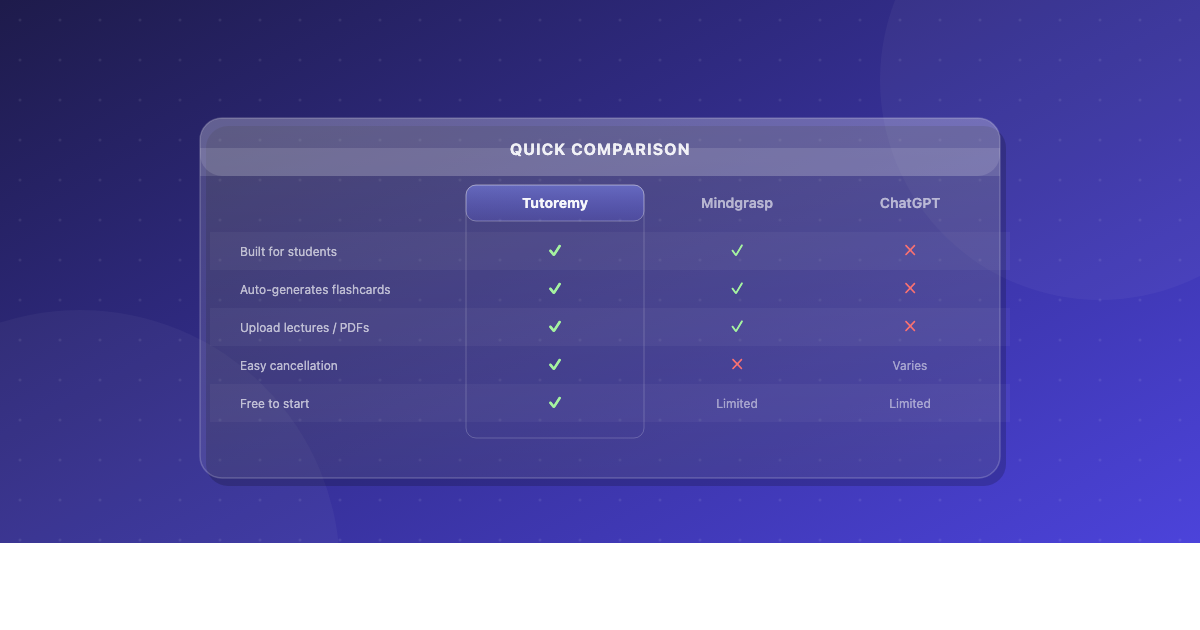
When Tutoremy isn't the right answer: if you're prepping for a standardized exam (MCAT, USMLE, bar) where a community Anki deck exists, use Anki. If you mostly want to drill pre-made decks from someone in your class, use Quizlet or Knowt. Tutoremy is built for the workflow where you're starting from your professor's actual materials.
Best for: the version of you who knows you should be doing flashcards and active recall, but the activation cost of making the cards is what kills you every time.
5. Brain.fm — for the focus problem that headphones can actually fix
Brain.fm uses functional music — sound engineered to increase focus rather than entertain — and has an explicit ADHD mode. There's real research behind it (it's not just "lo-fi beats"), and a meaningful percentage of ADHD students report that putting on Brain.fm with the ADHD setting is the difference between staring at a page and actually reading it.
It's not magic. For some students it does nothing. For others it's the most effective focus tool they've ever used. The free trial is 7 days, which is enough to know if you're in the second camp.
Free alternatives in the same category: Endel (free tier exists), instrumental movie soundtracks on Spotify, brown noise (free everywhere), or just noise-canceling headphones with nothing playing.
Best for: students who can't focus in silence and can't focus with regular music either.
6. Forest — for the gamified accountability loop
Forest gamifies focus by turning phone resistance into a tree-growing game. You start a session, plant a virtual tree, and if you leave the app before the timer ends, the tree dies. Over time you grow a forest. It's silly. It works.
The reason Forest works for ADHD specifically is that the consequence (killing the tree) is immediate. ADHD brains struggle with delayed consequences ("you'll regret not studying tomorrow") but respond strongly to immediate ones ("you'll murder a virtual tree right now"). Same reason streak apps work: the loss is felt instantly.
Cost: Free core; ~$4 one-time for premium features (extra tree species, white noise).
Free alternative: Cold Turkey Blocker on desktop (Windows/Mac), which physically blocks distracting sites for the duration you set.
Best for: students whose biggest distraction is their own phone.
For the time-blindness problem (when "next week" doesn't feel real)
If you know what you should be studying but you keep waiting until 11pm the night before, this is your category.
7. TimeTimer or Visual Countdown apps — for making time visible
The default ADHD brain pattern is to perceive time as now and not now, with nothing in between. You can fight this by making time literally visible. A TimeTimer (the physical or app version) shows a red disk that shrinks as time passes — so you can see 30 minutes disappearing in real time. A regular clock doesn't do this; you have to mentally calculate how much time has passed, and the calculation is the part ADHD brains skip.
Free alternatives: any visual countdown timer app on the App Store or Google Play. Search "visual timer ADHD" and pick whichever has the cleanest UI. Many are free.
Best for: students who routinely start a "30 minute study session" and look up 4 hours later (or 5 minutes later) with no idea how much time has actually passed.
8. Spaced repetition apps (any of them) — for handling the future for you
Spaced repetition tools handle the time-blindness problem at the system level: you don't have to decide when to review what. The app surfaces the right material at the right time, and you just do whatever it shows you that day. It's the closest thing to "outsourcing the future" that exists in study tools.
The three free options:
Anki — most powerful, steepest learning curve, free on desktop/Android
Tutoremy — friendlier UI, AI-generated cards from your material, real free tier
Knowt — free Quizlet replacement with basic spaced repetition
If you're a long-haul student (med school, law school, language learning), Anki wins. For most college students, Tutoremy or Knowt is enough. The app matters less than the fact that you no longer have to plan when to review what.
Best for: any ADHD student who has ever opened a planner, written "study chapter 5," and never looked at it again.
For the organization problem (where do I even put everything?)
9. Notion — workspace, with some caveats
Notion is the most popular workspace for college students, including those with ADHD, because it lets you put everything in one place. The risk for ADHD students specifically is that setting up Notion becomes the ultimate procrastination activity. Spending 4 hours building the perfect class dashboard is exactly the kind of high-novelty, low-stakes work that ADHD brains love and that does not actually advance your studying.
If you use Notion: set a 30-minute timer the first time, build the simplest version, and start using it. Do not customize. Do not look at templates on TikTok. The plain version is enough.
Free alternative: Apple Notes is honestly enough for 70% of students and removes the tweak-forever temptation entirely.
Best for: students who want everything in one place and can resist the urge to spend three hours decorating it.
How to actually pick from this list
If you install all 9 of these apps, you will spend more time managing apps than studying. Don't do that. Here's the lean stack:
1. One activation tool: Goblin Tools (free) is the right answer for almost everyone.
2. One active-recall study tool: Tutoremy if you want the cards generated for you, Anki if you're willing to learn the curve.
3. One focus tool: Forest, Brain.fm, or Cold Turkey — whichever your bottleneck is.
4. One organization tool: Notion or Apple Notes. One. Pick one.
5. (Optional) One lecture tool: Glean if your school provides it through disability services.
Five apps. Total cost: $0–25 depending on whether you're on iOS for Anki. That's the entire core stack.
What to ignore
Most "AI productivity assistants" that promise to do your scheduling for you. The ones that work require a lot of setup, which is the opposite of what ADHD brains can sustain.
Aesthetic Notion templates on TikTok. They are dopamine for the part of your brain that doesn't have to write the essay.
Habit-tracker apps for ADHD specifically. The early-stage dopamine of streaks works, but the moment you miss a day, the system collapses and you abandon it. They're net negative for most ADHD users.
"Mindfulness" study apps. Meditation has real benefits for ADHD, but most mindfulness study apps are wellness products in study app clothing. If you want meditation, use Headspace or Calm. If you want studying, use the tools above.
The uncomfortable closing point
No app on this list will fix ADHD studying by itself. The technique matters more than the tool. The biggest improvement most ADHD students make in their academic performance comes not from a new app but from switching from passive reading to active recall, which is something you can do with index cards and a pen if you have to.
That said, the right app removes friction at exactly the points where ADHD brains get stuck — the activation moment, the boring middle, the long-future test that doesn't feel real yet. If a tool genuinely lowers the friction at one of those points, it's worth installing. If it just adds a new thing to manage, it isn't.
Pick one tool from each section. Use it for two weeks. Keep what helps, drop what doesn't. Don't try to optimize a tool stack you haven't proven works for you yet.
---
Tutoremy turns your lectures, slides, and notes into flashcards and practice quizzes automatically — removing the activation cost that's usually the hardest part of studying with ADHD. Free tier always, no trial timer, no credit card.