Blog/The Best Free Study Apps for College Students in 2026 (No Trial Timers, No Catches)
Tutoremy Blog·AI & Technology·10 min read
The Best Free Study Apps for College Students in 2026 (No Trial Timers, No Catches)
TT
Tutoremy Team
Editorial · April 9, 2026
Why "free" needs an asterisk
Search "free study apps for college students" and you'll get 30 lists with the same problem: most of the apps on them aren't actually free. They're free for 7 days, or free for 5 cards, or free with ads on every other action, or free for the first quiz and then
9.99 to see your score.
This list only counts apps that meet a stricter bar: you can use them all semester without paying anything. Not a trial. Not a freemium funnel that breaks at the moment you need it. A real, persistent free tier.
We make Tutoremy, which has a free tier that meets this bar (no trial timer, no credit card), so we have a bias. We're going to be honest about it — Tutoremy isn't always the right answer for every student, and we'll tell you when other free apps beat us.
The bar we're using
To make this list, an app has to meet all four:
1. Free tier with no time limit — not a 7-day or 14-day trial
2. Free tier covers a real use case — not "first quiz free, then pay"
3. No credit card required to start
4. Actually useful, not just a freemium funnel toy
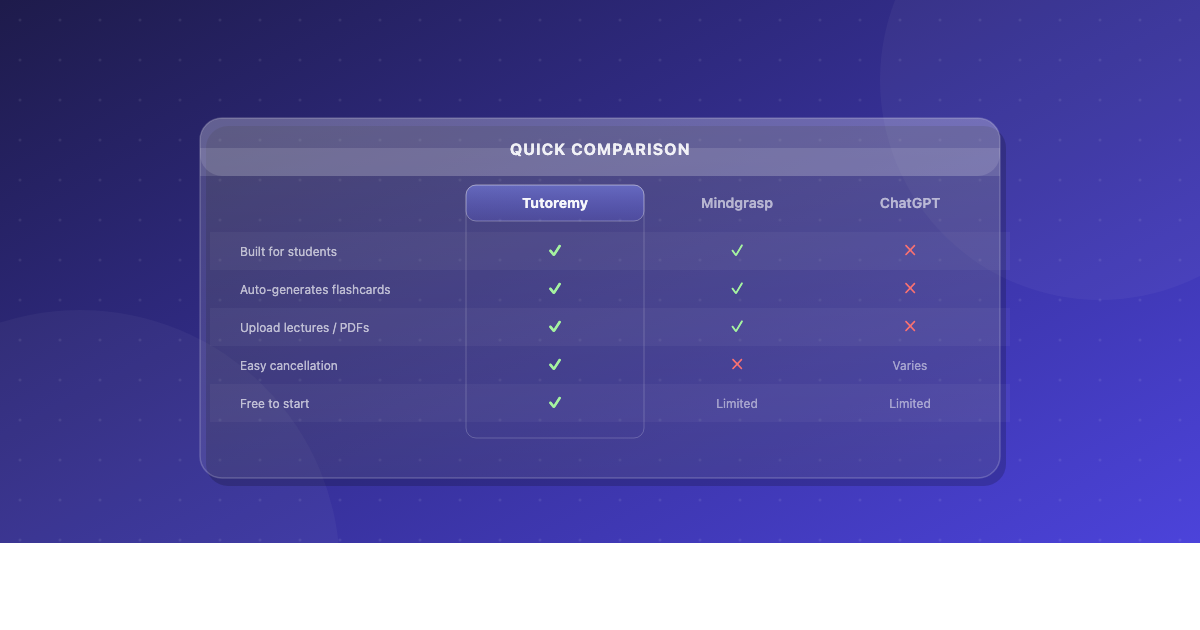
Apps that don't meet this bar — Quizlet (Learn/Test mode is paid), Mindgrasp (trial-based), and most "AI study apps" with credit-card walls — get an honorable mention at the bottom.
1. Anki — the gold standard, free on desktop and Android
Free on Mac, Windows, Linux, and Android. The iOS app costs
5 (one-time, but we'd be lying if we left it out). The desktop and Android versions are completely free, ad-free, and the most powerful spaced-repetition system that exists. The community decks alone — AnKing for med school, MCAT decks, language decks — are worth more than every paid study tool combined.
What you get for free: the entire app, every feature, every algorithm, every plugin, plus access to thousands of pre-made community decks.
Caveat: the UI is rough, the iOS app costs money, and the learning curve is steep. Most students bounce off in the first week. But if you can get past that week, no other free tool comes close.
Best for: long-term memorization, language learning, med/law/MCAT prep, anyone willing to invest a few hours up-front for years of payoff.
2. Tutoremy — AI flashcards from your own course materials, free tier always
We're including ourselves at #2 because the use case is genuinely free and genuinely different from Anki. Tutoremy turns your lecture slides, PDFs, notes, and YouTube lectures into flashcards and quizzes automatically. Free tier, no trial, no credit card.
What that means in practice: you upload your professor's slides for tomorrow's quiz, and 30 seconds later you have a flashcard deck and a practice quiz built specifically from that material. You don't have to make cards by hand. You don't have to find a community deck (there isn't one for your specific class).
What you get for free: upload course materials, generate flashcards and quizzes, study with spaced repetition built in.
When Tutoremy isn't the right answer: if you're prepping for a standardized exam (MCAT, USMLE, bar) where a community-built Anki deck already exists, use that. If you just want to drill pre-made sets that someone in your class already created on Quizlet, search Quizlet first. Tutoremy is built for the workflow where you start from your professor's actual materials.
Best for: college students with a lot of professor-specific lecture material who don't want to spend an hour making flashcards by hand.
3. Knowt — the free Quizlet replacement
Knowt is positioned as the free version of Quizlet, and it actually delivers. The Learn-style mode is free, practice tests are free, you can import your old Quizlet sets directly by pasting the URL, and the AI features for generating cards from notes are also free.
What you get for free: unlimited flashcards, Learn mode, practice tests, AI flashcard generation, basic spaced repetition, Quizlet import.
When Knowt isn't the right answer: for serious long-term spaced repetition, Anki's algorithm is meaningfully better. For class-specific AI generation from your own slides, Tutoremy is built for that workflow. But for the "I just want what Quizlet used to be, without the paywall" use case, Knowt is the obvious answer.
Best for: high schoolers and underclassmen with existing Quizlet sets who want to migrate without losing anything.
4. NotebookLM — Google's source-grounded study tool
NotebookLM is Google's research-and-study tool. You upload sources — PDFs, slides, YouTube videos, web pages, audio recordings — into a "notebook," and NotebookLM lets you ask questions about them, generates summaries, and (since late 2025) automatically creates flashcards and quizzes. It's source-grounded, which means everything it tells you is traceable to a specific spot in your uploaded material — no hallucinations.
What you get for free: all of it. NotebookLM has no paid tier for students.
The famous feature: the AI-generated audio overview, which converts your uploaded material into a 15-minute conversational podcast. Genuinely magical for review during commutes or workouts.
When NotebookLM isn't the right answer: if you want spaced-repetition scheduling (NotebookLM doesn't have this yet), or if you want a study system organized around your specific courses rather than free-form notebooks. Pair NotebookLM with Tutoremy or Anki for the part NotebookLM doesn't handle.
Best for: students who want to deeply understand uploaded source material with cited answers, and who learn well from audio review.
5. Notion — workspace, with .edu free plan
Notion is primarily a workspace, not a study app, but it's on this list because the .edu free plan removes nearly every limit and it's where most college students organize their classes, assignments, schedules, and notes. The free plan is generous enough that you'll probably never need to upgrade.
What you get for free: with a .edu email, essentially unlimited usage — pages, blocks, file uploads, AI features (depending on Notion's evolving rules), and team sharing.
When Notion isn't the right answer: if you mostly handwrite notes (use GoodNotes), if you want spaced repetition (Notion doesn't have it), or if you fall into the "spent 4 hours building the perfect template instead of studying" trap.
Best for: students who want one organized workspace for everything school-related, and who are disciplined enough to stop tweaking templates and start using the thing.
6. Forest — the focus app that turns phone resistance into a tree
Forest gamifies focus. You start a session, plant a virtual tree, and if you leave the app before the session ends, the tree dies. Over time you grow a forest. It sounds gimmicky and it works — for a meaningful percentage of students, the dumb little tree creates exactly enough accountability to make the difference.
What you get for free: the core focus timer with tree-growing mechanic. The premium version (around $4 one-time) unlocks additional tree species and white-noise backgrounds, but the free version is fully functional.
Best for: students who get distracted by their phone every 4 minutes and need a low-stakes accountability mechanism.
Free alternatives in the same category: Cold Turkey Blocker (Windows/Mac), Freedom (free tier limited but works for short sessions), Apple Screen Time / Android Digital Wellbeing (built into your phone, free, surprisingly underused).
7. Khan Academy — the free university
Khan Academy is on every "free study apps" list for a reason: it's the most comprehensive free educational platform in the world, covers everything from elementary math through college calculus, statistics, biology, chemistry, and now AP courses. The interactive practice problems are the reason it works — you don't just watch videos, you immediately practice.
What you get for free: all of it. Khan Academy has no paid tier for students. Funded by donations.
Best for: students who need to relearn foundational material before tackling a harder college course (the "I forgot all my high school algebra and now I'm in calc 1" situation), or anyone in intro STEM courses.
8. Zotero — the free reference manager researchers actually use
If you write research papers, Zotero is non-negotiable. It's free, open-source, integrates with Word and Google Docs, generates citations in any format you need (APA, MLA, Chicago, IEEE, the works), and stores PDFs of every paper you cite. The alternative is paying for Mendeley or EndNote, which both do the same thing slightly worse.
What you get for free: the entire app, with 300 MB of free cloud storage (enough for hundreds of papers; pay for more if you need it, or use local storage and skip the cloud entirely).
Best for: any student who writes anything longer than 5 pages with citations. Especially anyone in the humanities, social sciences, or any thesis project.
9. Apple Notes / Google Keep — the boring answer that's enough for most people
We mentioned this in the note-taking comparison, but it's worth repeating: for a lot of students, the notes app already on your phone is enough. Apple Notes and Google Keep are both free forever, sync across devices, support handwriting on tablets, and have improved dramatically over the past two years. If you spend more time picking a notes app than taking notes, the right answer is "use whatever's already installed."
Best for: students who want zero setup and don't want to maintain a notes system.
10. Grammarly (free version) — the writing assistant the free tier of
Grammarly's free tier catches the most common writing mistakes — typos, basic grammar, awkward phrasing — without requiring an upgrade. The premium tier offers tone suggestions, plagiarism checks, and clarity rewrites, but the free version is genuinely useful for most college papers. It's the one freemium app on this list where the free version is actually enough.
Best for: any student writing essays, application materials, or emails to professors who keep responding "I don't understand your question."
Honorable mentions (apps that promise free but don't really deliver)
Quizlet — Learn mode and practice tests are now paid (~$36/year). Free tier is too limited to be useful.
Mindgrasp / StudyFetch / Studley — most are trial-based or limit features behind a paywall almost immediately.
ChatGPT free tier — fine for one-off questions, but the rate limits make it impractical as a daily study tool.
If you're considering any of these and they have a free trial, that's fine — try them. But don't put them at the center of your semester's study workflow if you're not ready to pay.
The minimum viable free stack for a college student
If you only install five free apps for the entire semester:
1. Anki (or Tutoremy if Anki feels too clunky) — flashcards and spaced repetition
2. NotebookLM — for understanding uploaded source material with citations
3. Notion or Apple Notes — for organizing your courses
4. Forest or Cold Turkey — for focus when your phone keeps winning
5. Zotero — only if you write research papers
That's the entire core. Total cost: $0. (Or
5 once if you want Anki on iOS.)
Everything else on this list is auxiliary. Don't install all 10 at once — pick the ones that solve your specific bottleneck and ignore the rest.
TL;DR
App
Free tier reality
Best for
Anki
Fully free desktop/Android,
5 iOS
Long-term memorization, board prep
Tutoremy
Real free tier, no trial
AI flashcards from your course material
Knowt
Real free tier
Quizlet replacement
NotebookLM
100% free
Source-grounded research and study
Notion
Free with .edu
All-in-one workspace
Forest
Free core
Focus accountability
Khan Academy
100% free
Foundational STEM + AP
Zotero
100% free (+ local storage)
Reference management
Apple Notes / Google Keep
100% free
Quick capture
Grammarly
Free tier is enough
Writing assistance
---
Tutoremy turns your lectures, slides, notes, and PDFs into AI-generated flashcards and quizzes — with spaced repetition built in. Real free tier, no trial timer, no credit card.