The Best Study Apps for Economics Students in 2026
Tutoremy Team
Editorial · April 9, 2026
Why econ studying is its own thing
Economics is one of the most miscategorized college majors. People assume it's like business — something you mostly memorize. It isn't. Econ at the undergrad level is a mix of graph manipulation, mathematical reasoning, definitional vocabulary, and applied problem-solving, and at the grad level it tips heavily toward formal mathematical economics and econometrics. The right tool stack depends on which of those four you're being tested on this week.
Most "best apps for college students" lists are written for STEM majors who don't think about econ. Most "best apps for business students" lists treat econ like accounting, which it isn't. This post is the honest stack specifically for an econ student.
We make Tutoremy, an AI study app, and we'll mention it where it actually fits. Tutoremy is great for the definitional/vocabulary/conceptual side of econ and not the right tool for the math-heavy parts. Honest framing throughout.
What econ students actually need to study
Before the apps, the framing. An econ student's actual work breaks into four buckets:
1. Conceptual frameworks and definitions — supply and demand, elasticity, comparative advantage, monetary policy mechanisms 2. Graph manipulation — shifting curves, finding equilibrium, interpreting changes 3. Mathematical problem-solving — calculus-based optimization, statistical analysis, econometrics 4. Real-world applications — case studies, current events, papers
Most "study apps" only help with bucket 1. The other three buckets need different tools, and pretending one app can do all four is how econ students end up confused about why their flashcard deck isn't preparing them for the problem set.
1. For conceptual frameworks and definitions — Tutoremy
This is the bucket where flashcards genuinely shine. Econ has hundreds of named concepts, definitions, and frameworks that you have to recall on demand: marginal cost, opportunity cost, deadweight loss, the Phillips curve, the velocity of money, the multiplier effect, IS-LM, and dozens more. Pure recall, pure flashcard territory.
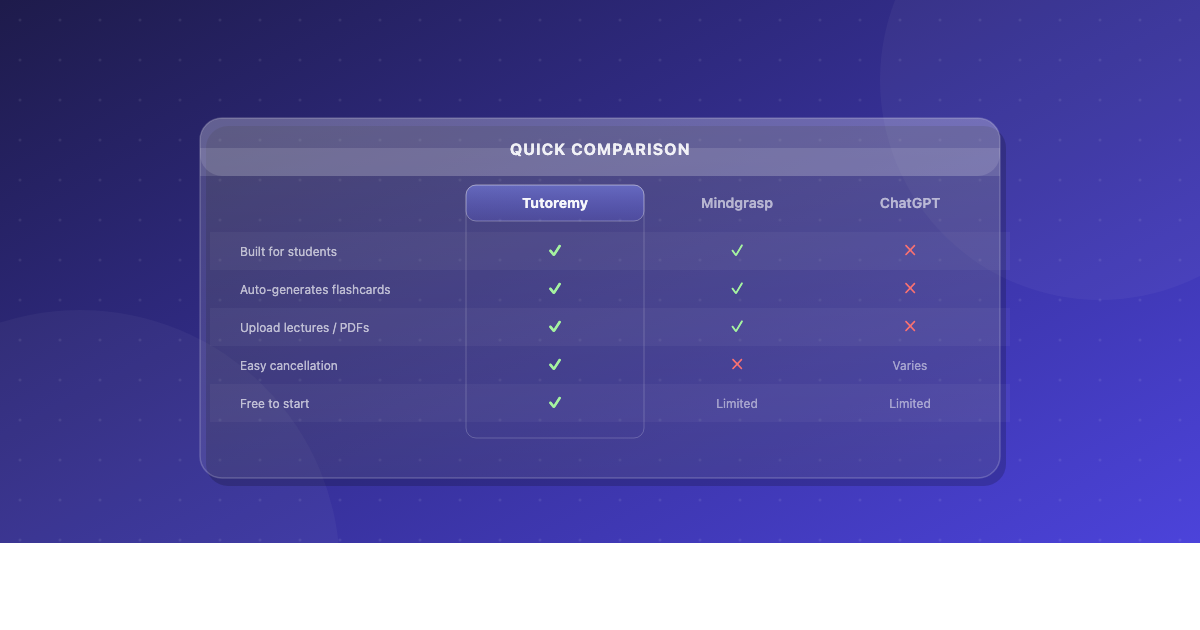
Tutoremy turns your textbook chapter, your professor's lecture slides, or your class notes into flashcards and a practice quiz automatically. Upload a Mankiw textbook chapter or your micro lecture deck, get back a study set in 30 seconds. The flashcards cover the testable concepts and definitions, and the spaced-repetition scheduling means you don't have to track when to review what.
Tutoremy has a real free tier — no trial timer, no credit card.
When Tutoremy isn't the right answer for econ specifically: when the question is "shift the AD curve and find the new equilibrium" — flashcards don't teach you to manipulate graphs. For that, see the next section.
2. For graph manipulation — practice problems, not flashcards
Graph problems are the most underprepared-for part of econ exams. They're not memorization; they're a procedural skill, and the only way to build them is to actually do graph problems repeatedly. Reading about how the AD-AS model works does almost nothing. Drawing the graph 20 times under timed conditions does almost everything.
The best resources for graph practice:
- Your textbook's end-of-chapter problems. Mankiw, Krugman, Mishkin — whichever your course uses. The end-of-chapter problems are still the best graph practice that exists.
- ACDC Econ on YouTube (Jacob Clifford) — the most popular econ teacher on YouTube. His videos walk through graph problems with the explicit reasoning at each step. Free, and basically required viewing for any AP Econ or intro micro/macro student.
- Marginal Revolution University (MRU) — free video courses by Tyler Cowen and Alex Tabarrok of George Mason. More sophisticated than ACDC but still accessible.
- Khan Academy's macro/micro courses — free, with built-in practice problems that include graphs.
3. For mathematical problem-solving — Wolfram Alpha and Symbolab
For intermediate micro, intermediate macro, intro econometrics, and any quantitative econ course, the math gets serious. You'll be doing optimization problems, taking partial derivatives, working with Lagrangians, running regressions.
Wolfram Alpha is the standard tool for checking your work. Type in a problem and it gives you the answer plus (with the paid Pro version) step-by-step solutions. Free tier shows the answer; the steps require Pro.
Symbolab is the cheaper alternative for step-by-step calculus help. The free tier shows steps for many problem types.
For econometrics specifically, you'll eventually need Stata, R, or Python — these aren't "study apps," they're the actual tools the field uses. If you're in any course beyond intro econ, learning R (free, open-source) is one of the highest-leverage things you can do for both your coursework and your job market.
4. For research papers and case studies — Zotero and your library's databases
Once you're past the intro level, econ involves reading papers — NBER working papers, journal articles, Fed research, IMF reports. You need:
Zotero — free, open-source citation manager. Saves PDFs of every paper you cite, generates citations in any format your professor wants, integrates with Word and Google Docs. Non-negotiable for any econ student writing research papers.
SSRN, NBER, and Google Scholar — the three main places to find econ working papers. All free. Most influential econ research is freely available in working paper form even when the published version is paywalled.
Your university library's database access — JSTOR, EconLit, ScienceDirect. Through your school login, you have free access to almost every major econ journal. Use it.
5. For organization — Notion or Google Drive (pick one)
Econ courses generate a lot of files: problem sets, lecture slides, recommended readings, your own notes, past exams. You need somewhere to put all of it.
Notion — the most popular workspace for college students. Free with a school email. Build a class dashboard with your assignment tracker, lecture notes, and exam prep schedule in one place. Risk: spending more time customizing the dashboard than studying.
Google Drive — the boring answer that's enough for many students. Folder per class, subfolders for problem sets/lectures/readings/exams. Search works well. Free.
Pick one. Don't bounce between three.
6. For long-term concept retention — Anki + community decks
For the GRE Economics subject test, intro AP Econ exams, or any cumulative final where you need a wide vocabulary in your head for a long time, Anki + a community-built econ deck is the right answer. The community decks for AP Econ are quite good; the GRE Econ deck is hit-or-miss but exists.
Free on desktop and Android,