The Best Study Apps for High School Students in 2026 (Honestly Picked)
Tutoremy Team
Editorial · April 9, 2026
Why this list is shorter than the others
Search "best study apps for high school students" and you'll get listicles with 30 apps. The problem with that format is that high schoolers don't actually need 30 apps. They need maybe 5, and the rest are noise that creates decision fatigue and steals time from studying.
This list is short on purpose. We make Tutoremy, an AI study app, and we'll mention it where it actually fits. But most of what's on this list isn't Tutoremy — because the right stack for a high schooler isn't dominated by any one tool.
A note on the audience: this list is for the average high schooler who wants to study more effectively without spending money. If you're prepping specifically for the SAT, ACT, or AP exams, we have separate posts on those. This one is the everyday "I have a chemistry test next week" stack.
What you actually need (5 categories)
Before the apps, the framework. A high schooler's tool stack breaks into five jobs:
1. Memorization for tests — flashcards, active recall 2. Content review when you're confused — videos, lessons, explanations 3. Note organization — somewhere to keep handouts, schedules, assignments 4. Focus when your phone keeps winning — focus apps and timers 5. Writing help — for essays and assignments
You need one tool from each category. Most students try to install ten things and use none of them. Pick five and use them.
1. For memorization — Tutoremy or Knowt (free)
This is where most studying actually happens, and where the biggest gains come from. The single most important shift you can make in how you study is from rereading your notes (which feels productive but doesn't work) to active recall — closing the book and trying to remember the answer.
The two free tools that are worth using:
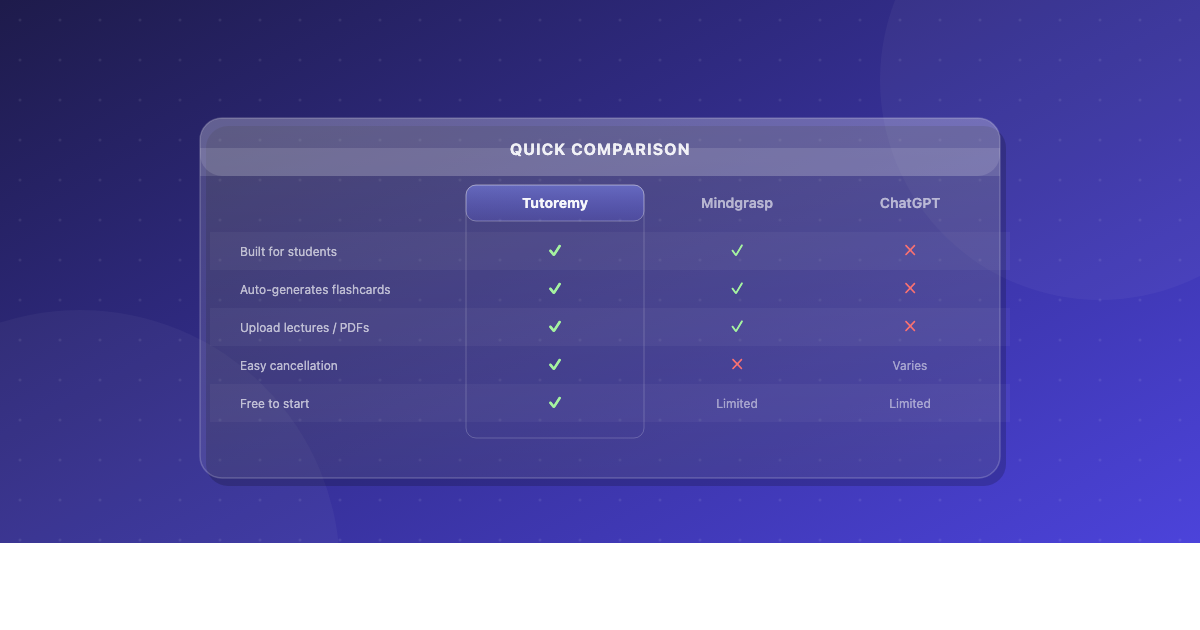
Tutoremy takes your textbook PDF, lecture slides, or class notes and generates flashcards and a quiz from them automatically. Upload the file, get back a study set in 30 seconds. Real free tier, no trial timer, no credit card. Built for high school and college students who don't want to manually type 50 flashcards.
Knowt is the free Quizlet replacement. If you've been using Quizlet but the paywall on Learn mode is annoying, Knowt has the same Learn-style mode for free. It also imports your old Quizlet sets directly — paste a URL and your old decks come over.
Pick Tutoremy if you want the AI to generate cards from your material. Pick Knowt if you mostly want to import existing Quizlet sets or make cards manually. You can use both — they don't conflict.
When neither is the right answer: if you're prepping for a standardized test like the SAT or ACT, Khan Academy is the better starting point (covered next).
2. For content review — Khan Academy (free)
When you're staring at your notes and you don't actually understand the material — when reading the textbook again isn't working — Khan Academy is the answer. It's free, covers almost every high school subject (math, science, history, English, AP courses), and the explanations are written by educators who know how high schoolers think.
The most underused feature: practice problems with step-by-step explanations. After you watch a video, do the practice problems. The combination of "watch the explanation" + "immediately try a problem" is what actually builds understanding, not just watching.
Khan Academy is also the official partner for the SAT, AP courses, and dual-credit content. It is genuinely the highest-leverage free educational resource that exists.
When Khan Academy isn't enough: for advanced or niche topics, YouTube has channels like Heimler's History (for APUSH and AP World), Crash Course (for any humanities subject), Organic Chemistry Tutor (for math, physics, chem), and 3Blue1Brown (for advanced math). Search for the topic + your favorite educator and you'll find a free explanation that beats most paid alternatives.
3. For note organization — Apple Notes, Google Keep, or Notion
You need somewhere to put your notes, your assignment list, your schedule, and the random PDFs your teachers send you. The good news: you don't need an expensive or complicated tool for this.
If you want zero setup: Apple Notes (on iPhone/Mac) or Google Keep (on Android) is genuinely enough for most high schoolers. Both are free, both sync across devices, both support photos and handwriting (on iPad), and both work in 5 seconds. The reason most students don't use them is that they're not "trendy," not because they're missing features.
If you want a class dashboard with assignment tracking: Notion. The free plan with a school email is generous enough to last all of high school. The risk with Notion is that you spend 4 hours building the perfect class dashboard instead of studying — set a 30-minute limit on setup and don't customize past that.
If you handwrite notes on an iPad with Apple Pencil: GoodNotes or Notability (
Pick one. Don't install all four.
4. For focus — Forest or your phone's built-in screen time controls (free)
If your phone is the reason you can't study, the right answer isn't an expensive focus app — it's the built-in tools you already have.
iPhone: Settings → Screen Time → App Limits. Block Instagram, TikTok, Snapchat, and Discord during your designated study hours. Free. Built in. 90% of students never enable it.
Android: Settings → Digital Wellbeing → App Timers. Same idea, same effect.
If you want something with more accountability, Forest is the gamified focus app that turns phone resistance into a tree-growing game. You start a session and if you leave the app, your virtual tree dies. It sounds silly. It works for a meaningful percentage of students.
Cold Turkey Blocker (Windows/Mac, free tier) is the desktop version — physically blocks distracting websites for the duration you set. The most disciplined version of this category.
5. For writing help — Grammarly free + Google Docs
For essays, assignments, and anything you have to write:
Google Docs for the actual writing. Free, autosaves, syncs everywhere, handles comments and suggestions for peer review and teacher feedback.
Grammarly's free tier for the polish pass. Catches typos, basic grammar errors, and awkward phrasing. The free version is enough for high school work — you don't need premium.
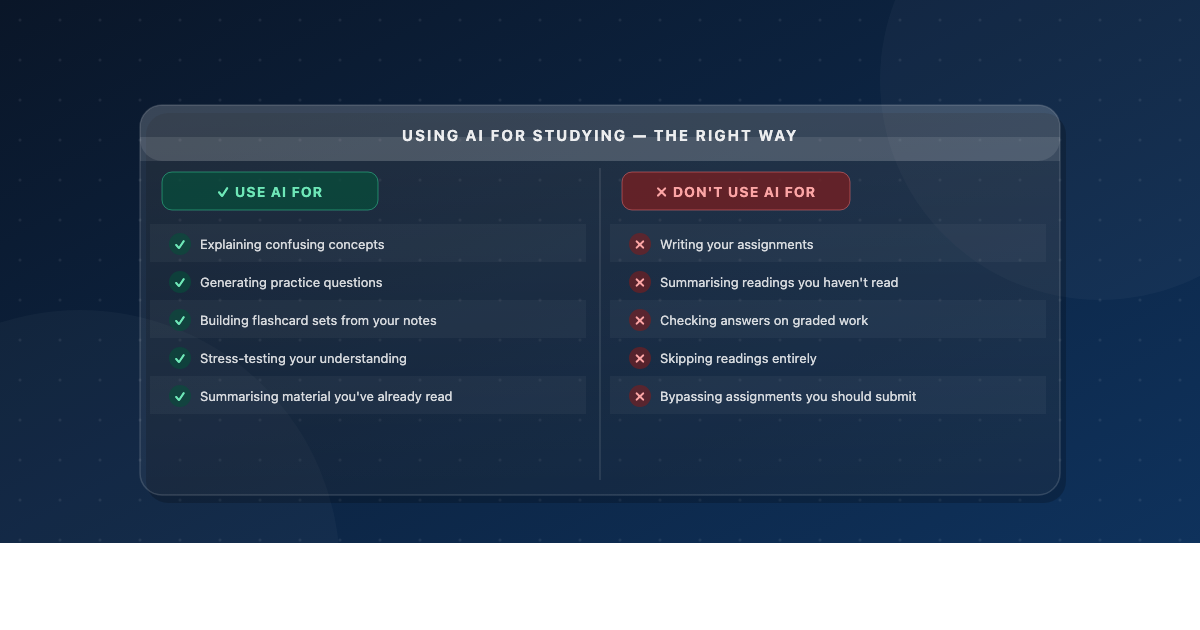
What to skip: AI essay generators. They produce mediocre essays that are increasingly easy for teachers to spot, and using them past a draft is academic dishonesty. The line between "AI brainstorm helper" and "AI essay writer" matters and the second one will burn you.
What to ignore
A few categories that come up in other "best apps for high schoolers" listicles that are mostly wasted installs:
- Habit-tracking apps. The dopamine of streaks is real but fragile — most students drop them after the first missed day. Net negative.
- AI tutoring chatbots with 5/month subscriptions. ChatGPT free tier and Khan Academy already do most of what they do.
- Aesthetic Notion templates on TikTok. They're beautiful and they will not improve your GPA. Spending 4 hours building a custom Notion dashboard is the academic equivalent of organizing your closet to avoid writing your essay.
- Calculator apps that aren't on the official approved list for your tests. If your school uses TI-84 or Desmos for math tests, use those for homework. Don't build muscle memory with a calculator you can't use on test day.
- Quizlet — still functional, but the free tier was gutted in 2022–2024 (Learn mode and Test mode are now paid). Knowt is the better free alternative.
The minimum viable stack (5 apps total)
If you only install five apps for the entire school year:
1. Tutoremy or Knowt — for flashcards and active recall 2. Khan Academy — for content you don't understand 3. Apple Notes / Google Keep / Notion — for organization (pick one) 4. Forest or your phone's screen time controls — for focus 5. Google Docs + Grammarly free — for writing
That's it. Total cost: $0. If you also have an iPad and Apple Pencil, add GoodNotes for ~
5.A realistic study session blueprint for a high schooler
Here's what an effective 90-minute study session looks like with this stack:
1. Decide what to study (1 minute). Don't open three subjects at once. Pick the test you have soonest. 2. Block distractions (1 minute). Turn on Forest or App Limits. Put your phone face-down across the room. No exceptions. 3. Generate study material (2 minutes). If it's a new chapter, upload your notes or the textbook PDF to Tutoremy and get flashcards back. If you already have a Knowt deck, pull it up. 4. Active recall round 1 (25 minutes). Try to answer each card from memory. If you get it wrong, go back to the source material, reread that section, then try the card again. 5. Break (5 minutes). Walk. Stretch. Drink water. Don't pick up your phone. 6. Active recall round 2 (25 minutes). Same loop. By now, you should be getting most cards right. 7. Quiz yourself (15 minutes). Take the auto-generated quiz from Tutoremy or write your own questions and answer them. 8. Review what you got wrong (10 minutes). Make targeted notes on the 2–3 things that keep tripping you up. 9. Done. Walk away. Sleep on it. Re-quiz tomorrow.
This is the loop that the top students in every class are doing, even if they don't call it that. It's not glamorous and it's not magic. It's just active recall + spacing + showing up.
Already studying for a class?
Tutoremy has free reference guides on dozens of high school topics — biology, chemistry, math, US history, English, psychology, economics, and more. If you need a refresher on something specific, browse the full library at tutoremy.ai/resources.
TL;DR
Job Tool Cost Memorization Tutoremy or Knowt Free Content review Khan Academy Free Organization Apple Notes / Notion / GoodNotes Free / ~ 5Focus Forest or built-in screen time Free Writing Google Docs + Grammarly free Free Five apps. $0. If you actually use them, your study time produces dramatically more than 30 apps you never opened.
---
Tutoremy turns your textbook chapters, lecture slides, class notes, and YouTube lectures into flashcards and quizzes — built around the active recall science that actually moves grades. Real free tier, no trial timer, no credit card.