Best Tools for Creating Class Notes and Study Materials (2026 Comparison)
Tutoremy Team
Editorial · April 9, 2026
If you're a teacher looking for a tool to create study materials, the options are overwhelming. Dozens of tools promise to save you time, but they all do slightly different things — and most comparison articles are thinly disguised ads for one product.
This post is a genuine comparison. We make Tutoremy, so we're biased — but we'll be upfront about what each tool does well, where it falls short, and who it's actually for. You should use whatever saves you the most time.
The Landscape: What Are We Comparing?
"Creating class notes and study materials" covers several distinct tasks:
1. Generating organized notes from lectures, textbooks, or slides 2. Creating flashcard sets for vocabulary and key concepts 3. Building practice quizzes for student review 4. Sharing materials with students
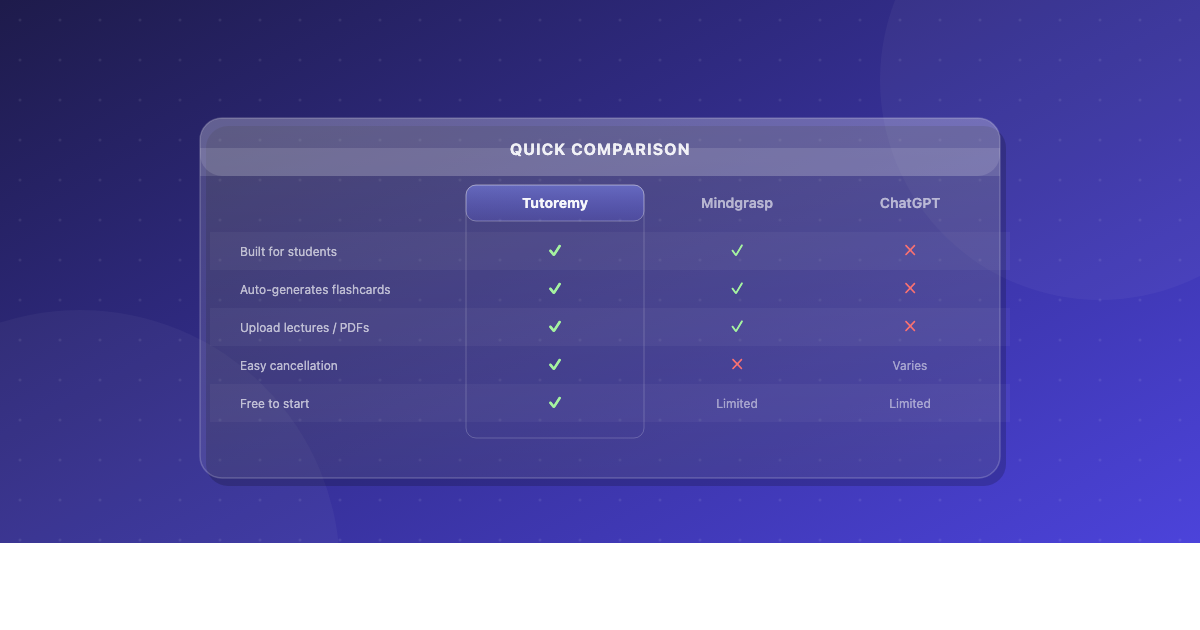
Different tools excel at different parts of this workflow. Here's how they stack up:
Tool-by-Tool Comparison
Tutoremy
What it does: Upload lecture slides, PDFs, or recordings. Get organized notes, flashcards, practice quizzes, and summaries — generated from your uploaded material.
Best for: Teachers who want to convert their existing materials into student-ready study aids without manual reformatting. Also great for parents who want to create study tools from school materials.
Strengths: - Source-faithful generation (from YOUR materials, not generic AI) - All-in-one output (notes + flashcards + quiz in one pass) - Shareable with students via link or PDF - Free to start
Limitations: - Newer platform — smaller user community than established tools - No in-class gamification features (not a Kahoot/Quizizz competitor)
Cost: Free tier available. Paid plans for higher volume.
Best fit: Teachers who value curriculum-aligned output and want one tool for notes, flashcards, and quizzes.
Quizlet
What it does: Create, share, and study flashcard sets. Includes study modes (learn, test, match game). Large library of user-created sets.
Best for: Students creating their own flashcards and studying independently.
Strengths: - Massive library of pre-made sets - Good study modes (spaced repetition, matching games) - Well-known — students already use it
Limitations: - Manual card creation is time-consuming for teachers (type each card individually) - Pre-made sets may not match your curriculum - AI generation is topic-based (generic), not source-faithful - Free tier has ads; many features require Quizlet Plus
Cost: Free with ads. Quizlet Plus: ~$36/year.
Best fit: Students who want to study independently with flashcards. Less ideal for teachers creating class-wide materials.
Quizizz
What it does: Create interactive quizzes students take on their devices. Gamified with timers, leaderboards, and memes. AI question generation from topics.
Best for: In-class formative assessment and review games.
Strengths: - Gamification drives student engagement - Large question library - Good for live classroom activities
Limitations: - Primarily a quiz tool — doesn't generate notes or flashcards - AI generation is topic-based, not from your specific materials - Better for formative assessment than study material distribution
Cost: Free with limits. Paid plans for advanced features.
Best fit: Teachers who want interactive in-class quizzes. Not a study material creation tool.
Knowt
What it does: AI flashcard and quiz generation for students. Can generate from uploaded notes or pasted text.
Best for: Students turning their own notes into flashcards and practice tests.
Strengths: - Can generate from uploaded text (not just topic keywords) - Free tier is relatively generous - Includes spaced repetition
Limitations: - Student-focused — no teacher dashboard or class sharing features - Smaller community than Quizlet - Output quality varies depending on input quality
Cost: Free tier available. Premium for additional features.
Best fit: Students who want AI-generated study tools from their own notes.
Brisk Teaching
What it does: Chrome extension for teachers. AI-generates feedback on student work, rubrics, lesson plans, and reading level adjustments.
Best for: Teachers who need writing feedback and lesson planning assistance.
Strengths: - Integrates directly into Google Docs - Rubric-aligned feedback saves hours on essay grading - Reading level adaptation for differentiation
Limitations: - Not a study material creation tool — doesn't generate flashcards, quizzes, or notes - Chrome-only (no mobile app)
Cost: Free tier available. School plans for advanced features.
Best fit: ELA teachers grading writing. Complementary to study material tools, not a replacement.
ChatGPT / Generic AI
What it does: General-purpose AI. Can generate flashcards, quizzes, notes, and summaries from prompts.
Best for: Ad-hoc generation when you need something specific and custom.
Strengths: - Infinitely flexible — can generate anything with the right prompt - Handles unusual or niche topics - No upload required — just describe what you want
Limitations: - Output is generic (from training data, not your materials) - Inconsistent formatting — different output every time - No sharing, distribution, or student-facing features - Requires prompt engineering to get good results - May hallucinate content or use different definitions than your class
Cost: Free (GPT-3.5) or