How to Turn a PDF Into Flashcards (Without Manually Typing Every Card)
Tutoremy Team
Editorial · April 9, 2026
Why this is finally a one-minute job
For most of college history, the answer to "how do I turn this PDF into flashcards" was the same as for "how do I turn anything into flashcards" — sit down, read it, and type each card by hand. A 30-page textbook chapter would eat 60–90 minutes of typing before you'd even started studying. Most students just skipped the flashcards entirely and went back to rereading, which doesn't work.
That stopped being true in 2024. Modern AI tools can now read a PDF, extract the testable concepts, and generate a clean set of flashcards in roughly 30 seconds. The catch is that most students still don't know this works, and the ones who do know often skip the step that actually matters — the drilling. This post is the workflow end to end, plus the part everyone gets wrong.
We make Tutoremy, which is one of the tools that does this. The workflow below works with any modern AI study tool that accepts PDF uploads — Tutoremy, RemNote, NotebookLM, Mindgrasp, StudyFetch, Knowt, Brainscape, ChatPDF, and a long list of others. We'll mention Tutoremy where it specifically fits, but technique matters more than brand.
The honest hierarchy: cards are step 2, not step 5
Most students believe the workflow is:
Convert PDF → Get cards → Studied.
The actual workflow is:
Pick the right PDF → Convert → Verify → Drill → Reinforce on a schedule → Studied.
Steps 1 and 2 are the easy 10%. Steps 3–5 are where retention actually happens. Most "PDF to flashcards" tutorials stop at step 2, which is why students who use them feel like they studied but bomb the test anyway. The cards file goes into a folder and never gets opened again.
This post covers all five steps.
Step 1 — Pick the right PDF
Before you upload anything, spend 60 seconds on this filter. Not every PDF is worth converting:
- Is the PDF aligned with what you'll be tested on? A textbook chapter your professor specifically referenced is high-value. A 200-page reference book where only chapter 7 is on the test is medium-value (only convert chapter 7). A random Reddit-recommended study PDF you've never seen before is low-value — be careful.
- Is the PDF actually text, or is it a scanned image? If it's a scan, OCR quality matters. Most modern AI tools handle scans fine, but blurry or low-resolution scans produce garbage output.
- Is the source trustworthy? A textbook published by a real publisher, a journal article, your professor's lecture notes — yes. A confidently-wrong PDF from somewhere on the internet that you'll then study hard from is worse than no studying at all.
- How long is it? Most AI tools handle up to about 100 pages well. For very long documents, split them by chapter and convert separately — you'll get better, more topic-organized flashcards.
If the PDF passes all four checks, move on. If it doesn't, find a better source first.
Step 2 — Upload and generate the cards
Almost any modern AI study tool accepts PDF uploads. The ones that work well in 2026:
- Tutoremy — drag in a PDF, get back flashcards, a quiz, and a summary, organized by guide
- RemNote — strong PDF upload with notes-and-flashcards in the same workspace
- NotebookLM — Google's free tool, source-grounded, added flashcards in late 2025
- ChatPDF — chat-based, generates cards on request
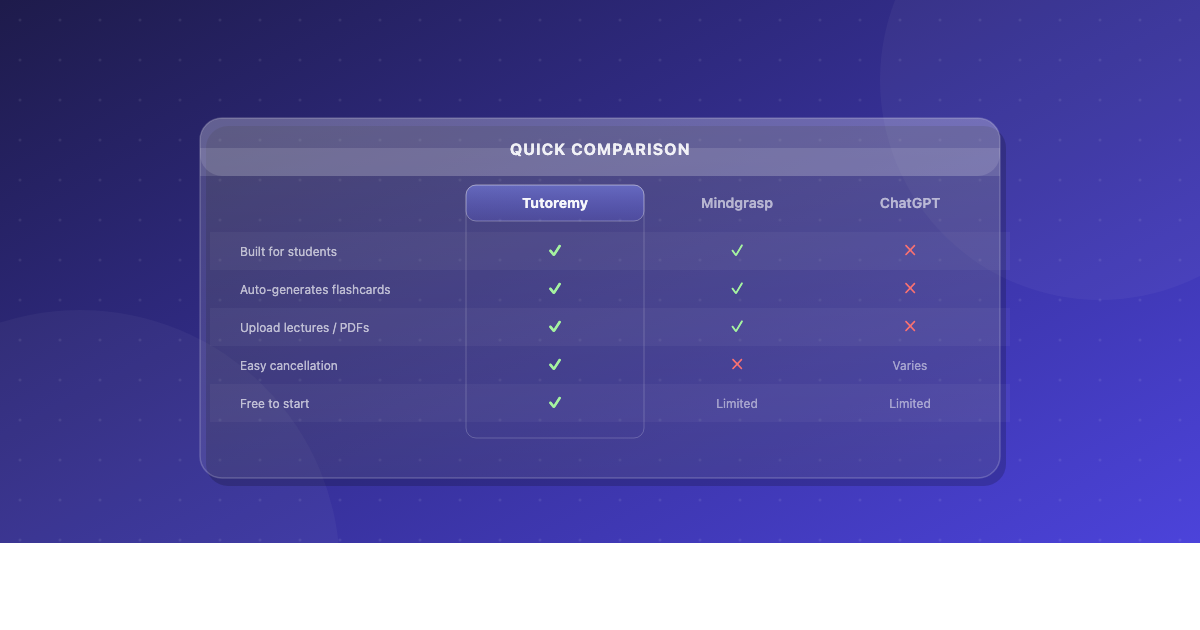
- Mindgrasp / StudyFetch / Scholarly / Limbiks / Revisely — all do this
- ChatGPT / Claude / Gemini — paste the PDF in with a prompt like "Generate 20 flashcards from this PDF in Q: / A: format"
The output across these tools is pretty similar: 15–40 flashcards depending on the PDF length, plus optionally a summary, a study guide, or a quiz. The differences are in spacing, organization, and how friendly the drilling experience is afterward.
Tutoremy specifically: drop the PDF in, get back flashcards + quiz + summary in one shot. Spaced repetition is automatic, so step 5 of this post is handled for you. Real free tier, no trial timer, no credit card.
If you don't want to commit to a study tool, the ChatGPT/Claude route works fine — but you'll need to manually copy the generated cards into Anki, Knowt, or another flashcard app for actual drilling. The dedicated tools save you that step.
Step 3 — Verify the cards (the step nobody talks about)
This is the step that separates students who study real material from students who study real-looking junk. Modern AI is good. Modern AI is not perfect. Skim the generated cards before you drill them and check for:
- Misread numbers, dates, or formulas. AI sometimes flips a 1 and a 7, or reads a 5 as an S in scanned PDFs. Check the cards with numerical content first.
- Hallucinated content. Occasionally an AI will generate a card for content that doesn't appear in the PDF — usually because it's "filling in" what it thinks should be there based on the topic. Delete any card that doesn't match anything in the source.
- Overly literal cards that just restate a sentence verbatim. These are technically accurate but not useful for retention. Either rephrase or delete.
- Cards from non-content sections — table of contents, references, copyright pages. Most tools will sometimes generate cards from these. Delete them.
Two minutes of verification protects you from 4 weeks of studying the wrong thing. Never skip this step.
Step 4 — Drill the cards (the step where retention actually happens)
You now have a clean set of flashcards. The single most common mistake from this point forward is treating the existence of the cards as the studying. The cards are not studying. The cards are inputs. The studying is the active recall loop:
1. Look at a card. Try to answer it from memory without looking at the PDF. 2. Check the answer. 3. If you got it right, set the card aside. 4. If you got it wrong, put it back in the pile. 5. Continue until you've answered every card correctly at least once.
Do this on the day you generate the cards, while the material is fresh in your mind from skimming the PDF. Then again 1–2 days later. Then 4–7 days later. Then once the day before the test.
Trying to recall something and failing feels uncomfortable. That discomfort is the muscle being built. If your studying feels effortless, it isn't working. The whole point of active recall is the effort of retrieval — that's what builds the memory trace, not the act of seeing the answer.
Step 5 — Reinforce on a schedule
A single drill session is much better than no drill session. But the same set of cards drilled across 5 days will dramatically beat 5 sessions on the same day, even though the total time is identical. This is the spacing effect, and it's the most reliable finding in the entire memory science literature.
For a PDF you have a week to learn:
- Day 0: Pick the PDF. Convert. Verify. First drill pass. ~60–80 minutes total.
- Day 1: 15-minute drill, no PDF.
- Day 3: 15-minute drill.
- Day 5: 15-minute drill, mixed with whatever else you're studying.
- Day 6 (the day before): 10-minute final drill on the cards you've consistently gotten wrong.
Total active time invested: ~2 hours over 6 days. Retention: substantially higher than someone who reads the PDF four times in one night — and they spent ~3 hours doing it.
If you're using Tutoremy, Anki, or another tool with built-in spaced repetition, the scheduling is automatic. If you're using a more basic flashcard tool, write the dates on a sticky note. The scheduling matters more than which tool you use.
A worked example: a 25-page biology PDF
Let's go end to end on one realistic case:
1. Pick (1 minute). Your professor posted a 25-page PDF on cellular respiration for next week's quiz. It's the right scope, real text (not a scan), and trustworthy. Move on. 2. Convert (30 seconds). Drop the PDF into Tutoremy. Out comes a deck of 22 flashcards plus a 10-question quiz plus a one-page summary. 3. Verify (2 minutes). Skim the cards. Find one card that quotes a sentence from the references section — delete it. Find one card where the AI misread "ATP synthase" as "ATP synthetase" — fix it. Done. 4. First drill (25 minutes). Run through all 22 cards. Get half wrong on the first pass. Reread the relevant section of the PDF for the wrong ones. Run them again. Get most right. 5. Day 1 (15 minutes). Cards only, no PDF. Anything you get wrong goes back in the pile. 6. Day 3 (15 minutes). Same. 7. Day 5 (15 minutes). Mix with the rest of the test material. 8. Day 6 (10 minutes). Final drill on the 3 cards you keep getting wrong.
Total active time: ~85 minutes over 6 days. Compare to reading the PDF three times (about 3 hours) with no retrieval — measurably worse retention. The convert-and-drill workflow wins on both time and outcome.
What PDF → flashcards is great at
- Definition-heavy material (vocab, terminology, named concepts)
- Lists and frameworks (the steps of a process, the components of a model)
- Formulas with worked examples
- Historical dates, names, and events
- Anything with a clear "this is the answer" structure
What PDF → flashcards is bad at
A few honest cases where this workflow isn't the right move:
- Procedural skills (math problem-solving, programming, lab techniques). For these, drilling cards on the procedure is much weaker than actually doing the procedure 20 times. Use the PDF to understand the framework, then go solve practice problems.
- Visual material like graphs, diagrams, or molecular structures. AI tools usually miss the visual content — supplement with hand-made cards or screenshots used as prompts.
- Scanned PDFs with bad image quality. Garbage in, garbage out. If the scan is blurry, the AI's reading will be unreliable. Either find a better source or be extra careful with verification.
- Material you don't understand yet. Flashcards reinforce; they don't teach. If the PDF is a topic you've never seen before, watch a YouTube lecture or read a textbook first to understand the concepts, then convert the PDF for drilling.
Comparing approaches: AI tool vs ChatGPT vs manual
| Approach | Time cost | Retention | When to use |
|---|---|---|---|
| Dedicated AI study tool (Tutoremy, RemNote, NotebookLM) | ~1 minute | Same as any flashcard workflow | Default — best balance |
| ChatGPT/Claude with the PDF pasted in | ~3 minutes | Same, but requires manual copy to a flashcard app | When you don't want to sign up for a study tool |
| Type cards from the PDF by hand | 60–90 minutes | Slightly higher (typing is a retrieval pass) | When the material really matters and you have the time |
For most students most of the time, the AI tool wins on time without losing meaningful retention — because the retention happens in step 4 (drilling), not in step 2 (creating the cards).
Where Tutoremy fits
Honest version: Tutoremy is built for exactly this workflow. The reasons we'd recommend it for the PDF use case specifically:
- Course-aware structure. Cards are organized by guide, so converting multiple PDFs across multiple classes doesn't turn into a flat dump.
- Spaced repetition is automatic. Step 5 of the workflow happens on its own.
- Real free tier. PDF upload, card generation, quizzes, and study mode are all free — no trial timer, no credit card.
When something else is the right answer: if you already use Anki and have a study system you trust, paste the AI-generated cards into Anki manually. If you're working on a NotebookLM notebook for the same source material, NotebookLM's native flashcards are perfectly good. If you use RemNote for notes already, stay there. The technique matters more than the brand.
TL;DR
- Modern AI converts a PDF to flashcards in ~30 seconds. Most students still don't know this.
- The conversion is the easy 10%. The drilling is the 90% that matters.
- Always verify the cards before drilling — 2 minutes saves you from studying junk.
- Drill across 5–6 days, not all at once. Spacing beats cramming.
- The cards aren't studying. Drilling them is studying.
---
Tutoremy turns PDFs, lecture slides, handwritten notes, and YouTube lectures into flashcards, quizzes, and a study system organized by course — with spaced repetition built in. Real free tier, no trial timer, no credit card.