How to Turn a YouTube Lecture Into Study Notes (Without Wasting the Lecture)
Tutoremy Team
Editorial · April 9, 2026
Why this post exists
You found a YouTube lecture that explains the topic better than your professor did. Maybe it's a Khan Academy video on enzyme kinetics, an MIT OCW lecture on linear algebra, an Organic Chemistry Tutor walkthrough of equilibrium, or a Crash Course episode on the French Revolution. You're about to do the same thing most students do: hit "Save to Watch Later," convince yourself you'll come back, and then never quite get around to studying from it.
If you do come back, you'll probably watch it again at 1.5x speed the night before the test, take some scattered notes, and call that studying. It isn't.
The actual problem isn't "how do I get notes out of a YouTube video." There are 50 free tools that do that in 30 seconds. The problem is that converting a video into notes is the easy 10% of the work — the 90% that matters is what you do with the notes after you have them. This post is about the whole loop, not just the conversion step.
We make Tutoremy, which is one of the tools that does the conversion. We'll mention it where it fits, but the core of this post is technique-first — you can follow the same workflow with any tool (or none) and get most of the benefit.
The honest hierarchy: notes are step 1 of 5, not step 5 of 5
Here's the workflow most students believe they're following when they convert a YouTube lecture into notes:
Watch lecture → Get notes → Studied.
Here's the workflow that actually leads to retention:
Watch lecture (or skim transcript) → Generate notes → Convert notes into questions → Test yourself on the questions → Reinforce on a schedule → Studied.
Steps 1 and 2 are the easy part. Steps 3, 4, and 5 are where the learning happens. Almost every "YouTube to notes" tool stops after step 2, which is why students who use them often feel like they "studied" but bomb the test anyway. The notes file goes into a folder, never opened again.
This post covers all five steps.
Step 1 — Picking the right video to convert
Not every YouTube lecture is worth converting. Spend 60 seconds on this filter before you invest the time:
- Is the video tightly aligned with what you'll be tested on? A 90-minute MIT lecture covers a lot of material. If only 20 minutes of it match your syllabus, just convert that 20 minutes.
- Does the video have a transcript? If yes, this whole workflow is 10x faster. (Almost all educational YouTube videos have auto-generated transcripts you can copy.)
- Can you find the timestamp of the part you actually need? Use the chapters in the YouTube video description, or scan the transcript for keywords. Don't process 90 minutes when you need 15.
- Is the source trustworthy? An MIT OCW lecture, a Khan Academy video, a 3Blue1Brown explainer — yes. A random "I got an A in this class" undergrad ramble — probably not.
If the video passes all four, move on. If not, find a different one.
Step 2 — Convert the video into notes (the 30-second part)
There are basically four ways to do this:
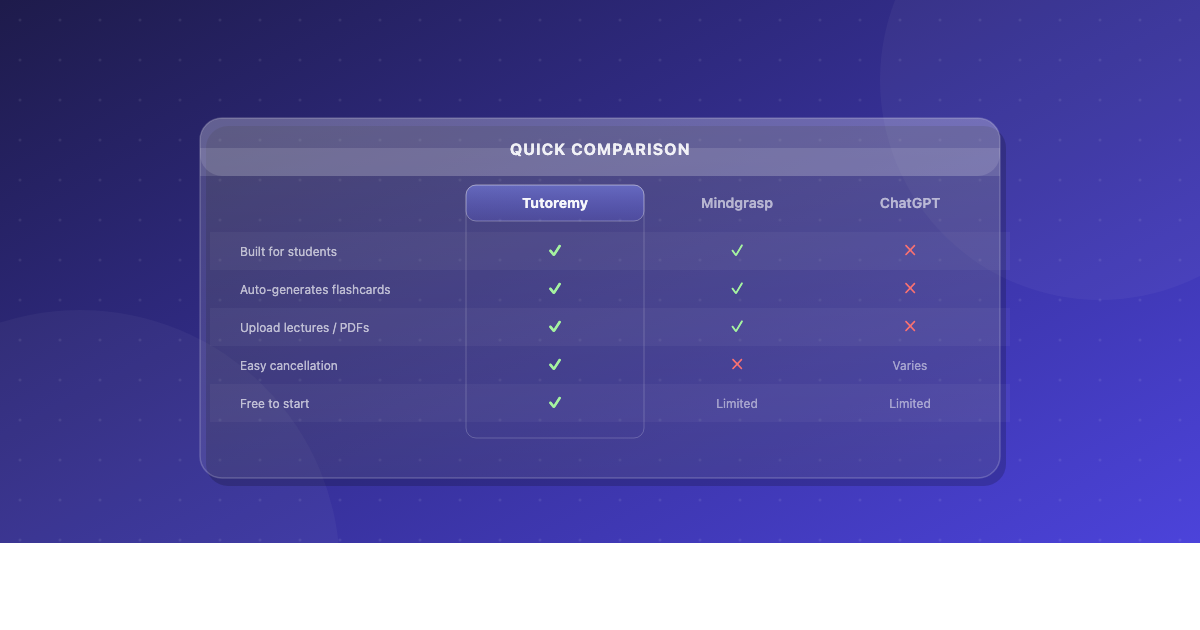
Option A — Use an AI study tool that takes a YouTube link as input. Paste the URL, hit go, get back structured notes (and ideally flashcards/quizzes). Tutoremy, RemNote, NoteGPT, Mindgrasp, StudyFetch, and a handful of others all work like this. Tutoremy specifically also gives you back a quiz and flashcard deck from the same video, which matters for steps 3–5 below.
Option B — Use the YouTube transcript + ChatGPT/Claude/Gemini. Click "..." under the video → "Show transcript" → copy the whole thing. Paste it into your AI of choice with a prompt like: "This is the transcript of a lecture on [topic]. Generate clean structured notes with main concepts, definitions, examples, and 15 quiz questions with answers." Free, works fine, slightly more friction.
Option C — Manual notes while watching. Pause every 30–60 seconds and write what you just heard in your own words. This is actually the most effective for retention because the rephrasing forces processing. It's also 10x slower. Use this for the most important 15 minutes of a video, not the whole thing.
Option D — Audio-only with a transcription tool. Useful if the lecture is conversational or if you want to listen on a walk. Most of the AI tools above accept audio/video uploads as well as YouTube links.
For most students, Option A is the highest-leverage choice — but only if you actually use the output for steps 3–5. Option C is the highest-effort but produces the strongest memory. Option B is the budget version of Option A.
Tutoremy has a free tier that does Option A (URL in, notes + flashcards + quiz out), which is why we exist for exactly this scenario. You don't need it to follow the rest of the workflow — but it removes the friction at the part most students get stuck.
Step 3 — Convert the notes into questions (the step everyone skips)
Notes by themselves are passive. You can read them five times and remember almost nothing. The act of converting notes into questions is where the learning starts.
There are two ways to do this:
Auto-generated. Most AI tools that take a YouTube link will also produce a quiz or flashcard set from the same video in one shot. Use it. Even if the questions are imperfect, having any set of questions is dramatically better than having none.
Manual. Read each section of your notes. For each main idea, write one question on the front of an index card and the answer on the back. For each definition, write the term on the front and the definition on the back. For each formula, write a worked example on the back of the formula. Aim for 15–25 cards per hour of lecture content.
If you only do one thing differently from how you usually study, do this. Active recall — which is what flashcards and quizzes are — is the single most effective study technique that exists, and it works whether the cards are auto-generated or hand-made.
Step 4 — Test yourself (the step where retention actually happens)
You have notes. You have questions. Now do this:
1. Look at a question. Try to answer it from memory without looking at the notes. 2. Check the answer. 3. If you got it right, set the card aside (you'll see it again, but later). 4. If you got it wrong, put it back in the pile. 5. Keep going until you've answered every card correctly at least once.
This is going to feel uncomfortable. Trying to recall something and failing is the literal opposite of how rereading feels. The discomfort is the muscle being built. If your studying feels effortless, it isn't working.
Do this once on the day you generate the notes. Then again 1 day later. Then again 3 days later. Then once more the day before the test. This is spaced repetition — and it's what turns "I sort of remember this" into "I can answer it under pressure."
If this scheduling sounds annoying to track manually, that's fair — it is. Tools like Tutoremy and Anki handle the scheduling for you so you don't have to think about it. But you can also just write the dates on a sticky note. The scheduling matters more than the system.
Step 5 — Reinforce on a schedule (the part that beats cramming)
A single retrieval session is better than no retrieval session. But 4 retrieval sessions spaced across a week beat 4 sessions in one night by a wide margin — even though the total time is identical.
Here's the rough schedule for a 1-hour YouTube lecture's worth of material, assuming you have 7 days until the test:
- Day 0: Watch (or skim transcript) → generate notes → generate questions → first retrieval pass. ~75 minutes total.
- Day 1: 15-minute retrieval pass on the same questions. No notes.
- Day 3: 15-minute retrieval pass. By now, most cards should feel easy. Drill the ones that don't.
- Day 5: 15-minute retrieval pass. Mix this material with anything else you're studying (interleaving — it forces your brain to discriminate between similar concepts).
- Day 6 (the day before): 10-minute final retrieval pass. Walk away. Sleep.
Total time invested: roughly 2 hours. Total retention: substantially higher than someone who watched the lecture three times and took 4 hours doing it.
A worked example: 1 lecture, end to end
Let's say you found a 60-minute YouTube lecture on the Krebs cycle. Here's the exact workflow:
1. Filter (1 min): The video has a transcript. The first 12 minutes are background you already know — skip them. The chapters you actually need are minutes 12–48. Time invested: 36 minutes of video, not 60. 2. Convert (1 min): Paste the YouTube URL into Tutoremy (or Mindgrasp, or RemNote, or your AI tool of choice). Out comes a structured set of notes plus 18 flashcards plus a 10-question quiz. 3. Question prep (0 min): Already done — the tool generated them. If you'd done this manually, add 20 minutes here. 4. First retrieval (25 min): Run through the 18 flashcards. Get about half wrong on the first pass. Reread the relevant section of the notes. Run through them again. Get most right. Run through the quiz once. 5. Day 1 (15 min): Cards only, no notes. Anything you got wrong goes back in the pile. 6. Day 3 (15 min): Same. 7. Day 5 (15 min): Same, plus interleave with whatever else you're studying. 8. Day 6 (10 min): Final retrieval pass on the cards you've consistently gotten wrong.
Total active time: ~80 minutes spread across 6 days. Retention: high. Compare to watching the video three times (180 minutes) with no retrieval — measurably worse retention, despite spending more than twice the time.
When the YouTube-to-notes pipeline isn't the right move
A few honest cases where this whole workflow is wrong:
- If your professor's lectures are well-aligned with the test. Use those instead. The closer the source material to the exam, the higher the leverage. A YouTube lecture is a complement, not a substitute, for material from the person actually writing the test.
- If the YouTube video is more than 90 minutes and you have less than 24 hours. The 1-day cramming protocol can't absorb that much new material. Pick the 30 most critical minutes instead.
- If the topic is procedural (math, physics problems, programming). Watching and notes won't help you solve problems. You learn problem-solving by doing problems, not by reading about problems. Use the video to understand the concept, then immediately go solve 10–20 practice problems.
- If the source isn't trustworthy. A confidently-wrong YouTube video that you study hard from is worse than no studying at all.
The "tools change, technique doesn't" point
There are dozens of YouTube-to-notes tools right now, and there will be a hundred next year. Tutoremy, RemNote, NoteGPT, Mindgrasp, StudyFetch, NotebookLM (Google's tool), Scholarly, Jungle — and the list grows monthly. Most of them are 90% the same product with slightly different UIs.
The thing that doesn't change is the workflow:
1. Pick the right video 2. Convert it into notes 3. Convert notes into questions 4. Test yourself on the questions 5. Reinforce on a schedule
If you do steps 1–2 with any tool and stop, you'll feel like you studied but you didn't. If you do all five steps with any tool — including no tool at all — you'll retain it. The technique is the variable.
TL;DR
- Notes are step 1 of 5. Studying is steps 3–5.
- Pick the right 15–30 minutes of the video, not the whole thing.
- Use any AI tool to convert (Tutoremy, RemNote, Mindgrasp, NoteGPT — they all work).
- The thing that matters is what you do after: convert notes into questions, test yourself, reinforce on a schedule.
- Watching a lecture three times is worse than watching it once and quizzing yourself four times.
---
Tutoremy takes a YouTube link, a PDF, lecture slides, or your handwritten notes and turns them into structured notes, flashcards, and a practice quiz — with spaced repetition built in so the scheduling above happens automatically. Free tier always available, no trial timer.